How to Set Up Residential Proxies in MoreLogin (with Screenshots)
Published: 3 August 2026 · Tested on MoreLogin V2.62.0 (macOS), free plan · Every step shown on a real profile
TL;DR: MoreLogin gives each profile its own fingerprint; a residential proxy gives it a trustworthy IP. Click New profile and switch to Advanced create — Quick create has no proxy fields. In the Proxy block set type HTTP, server gw.roamproxy.com, port 41080, account = your Roam username + -country-us, then your password. Click proxy detection, wait for "Pass detection", hit Confirm, then Start the profile and verify a residential exit. This all works on MoreLogin's free plan.
MoreLogin is an antidetect browser built around multi-account work, with a free tier that covers two profiles — enough to test a proxy provider end to end before paying anyone. The fingerprint it generates only holds up if the profile also exits from a believable IP: a real home connection, not the datacenter your machine sits in. Here's how to give a MoreLogin profile a Roam residential exit, no plugin required.
Step 1 — Get your Roam credentials
Sign up at roamproxy.com, top up from $2, and copy three things: your proxy username, your proxy password, and the gateway gw.roamproxy.com:41080. HTTP and SOCKS5 share the same port. Append -country-<cc> to the username to choose the exit country, and -session-<id> to keep the same IP across launches.
Step 2 — Create a new profile
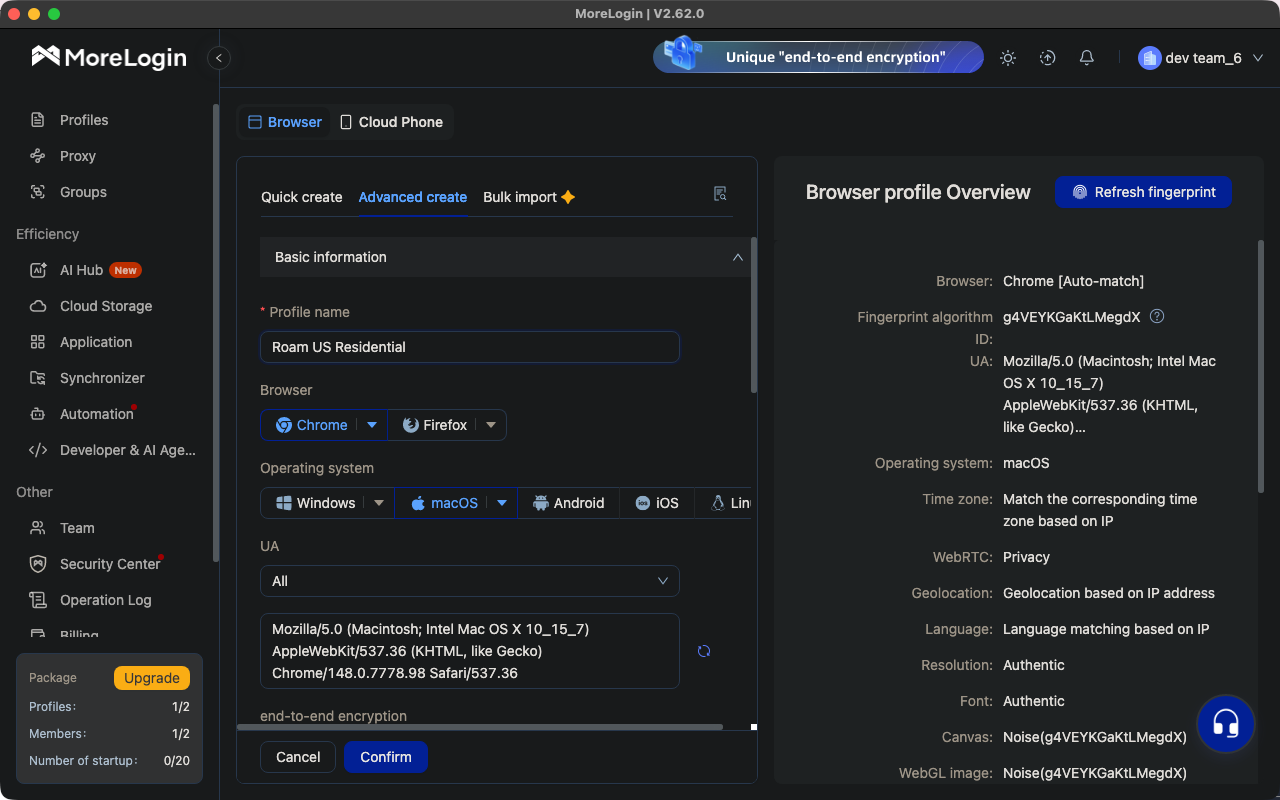
Click New profile, then switch from Quick create to the Advanced create tab. This matters: Quick create only asks for browser, OS and profile count — there is no proxy section on it at all. On Advanced create, replace the default name ("P-2") with something you'll recognize; we used "Roam US Residential". The Browser profile Overview panel on the right previews the fingerprint the profile will present.
Step 3 — Enter the Roam proxy
Scroll down to the Proxy block, leave Proxy Option on New proxy, and fill in:
- Proxy type: HTTP (SOCKS5 works on the same port if you prefer it)
- IP query channel: IP2Location (the default is fine — it's only used for the detection lookup)
- Proxy server:
gw.roamproxy.comPort:41080(the port sits in the same row, after the colon) - Proxy account: your Roam username +
-country-us(add-session-<id>for a sticky IP) - Proxy password: your Roam proxy password
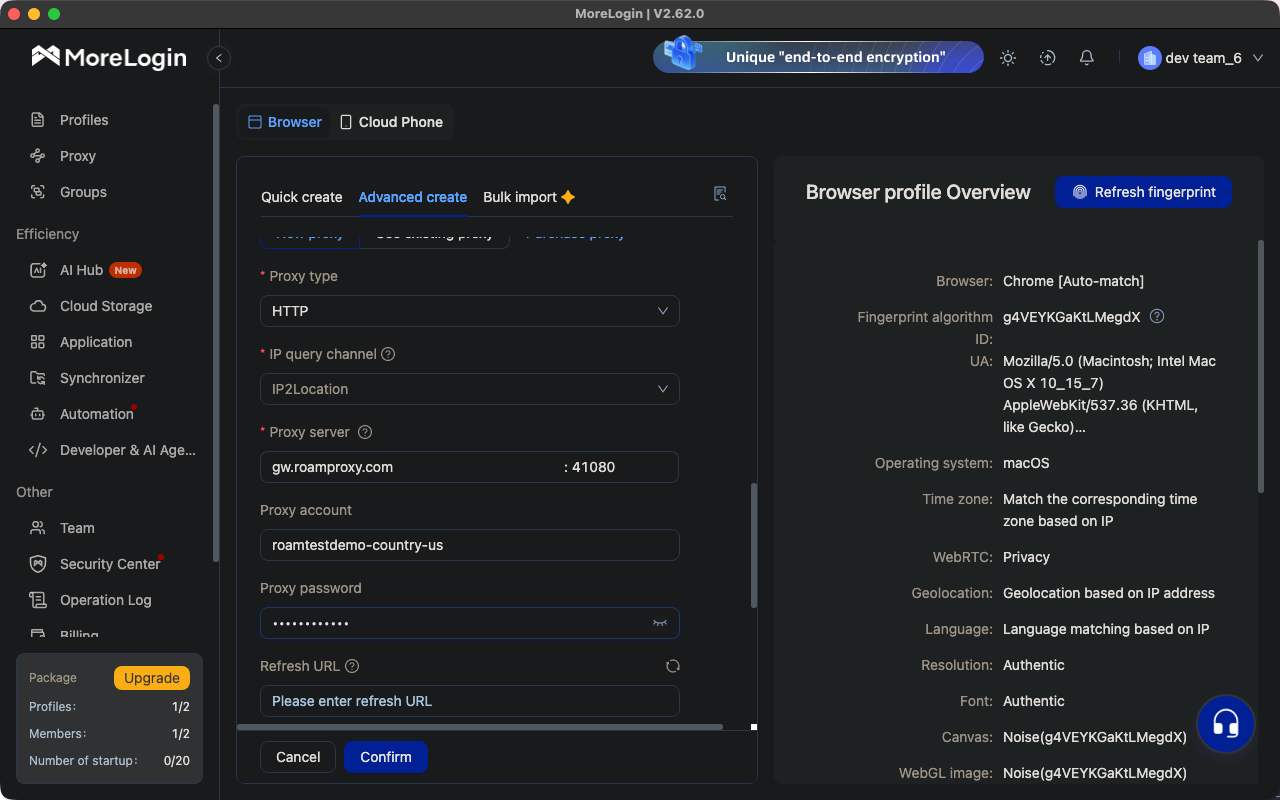
gw.roamproxy.com : 41080, account pinned to -country-us.Step 4 — Test the proxy
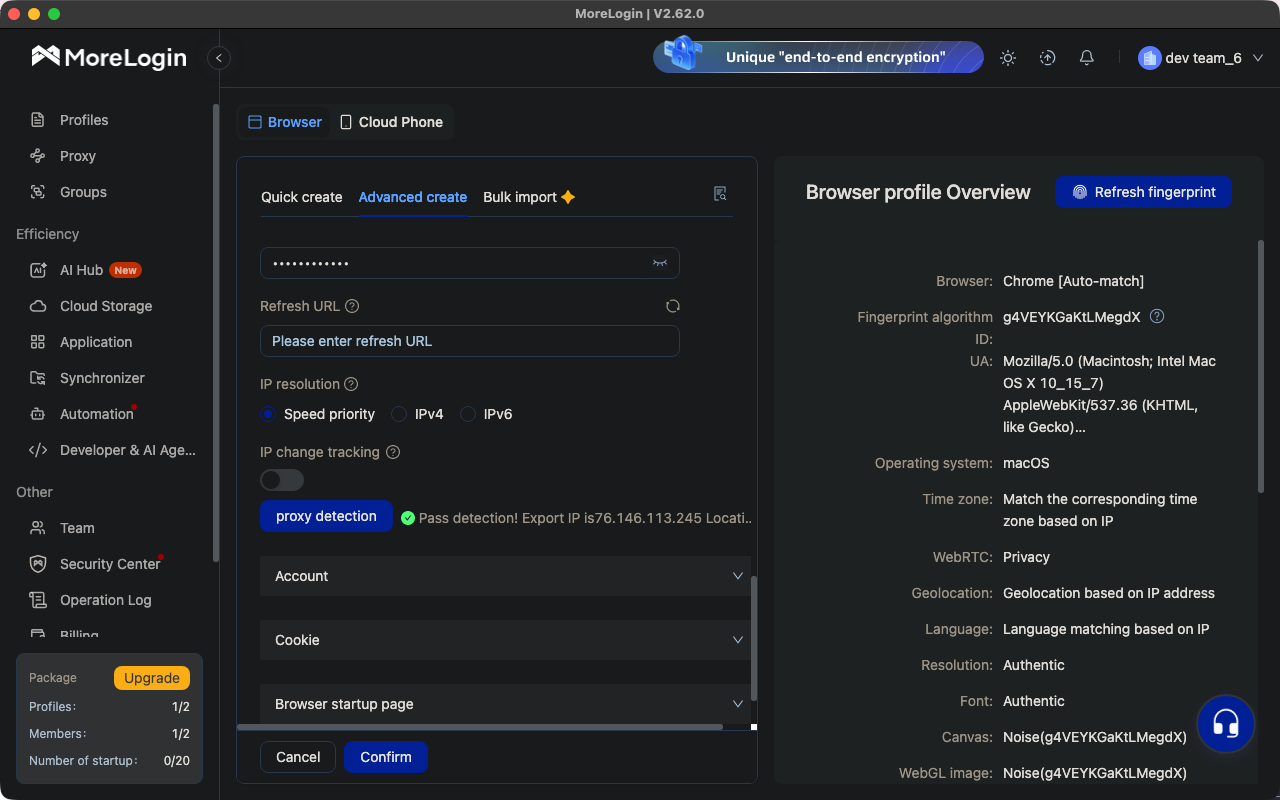
Just below the proxy fields, click proxy detection. MoreLogin opens a live connection through the proxy and answers with Pass detection! Export IP is … plus the resolved location — in our run a US export IP, before the browser had even launched.
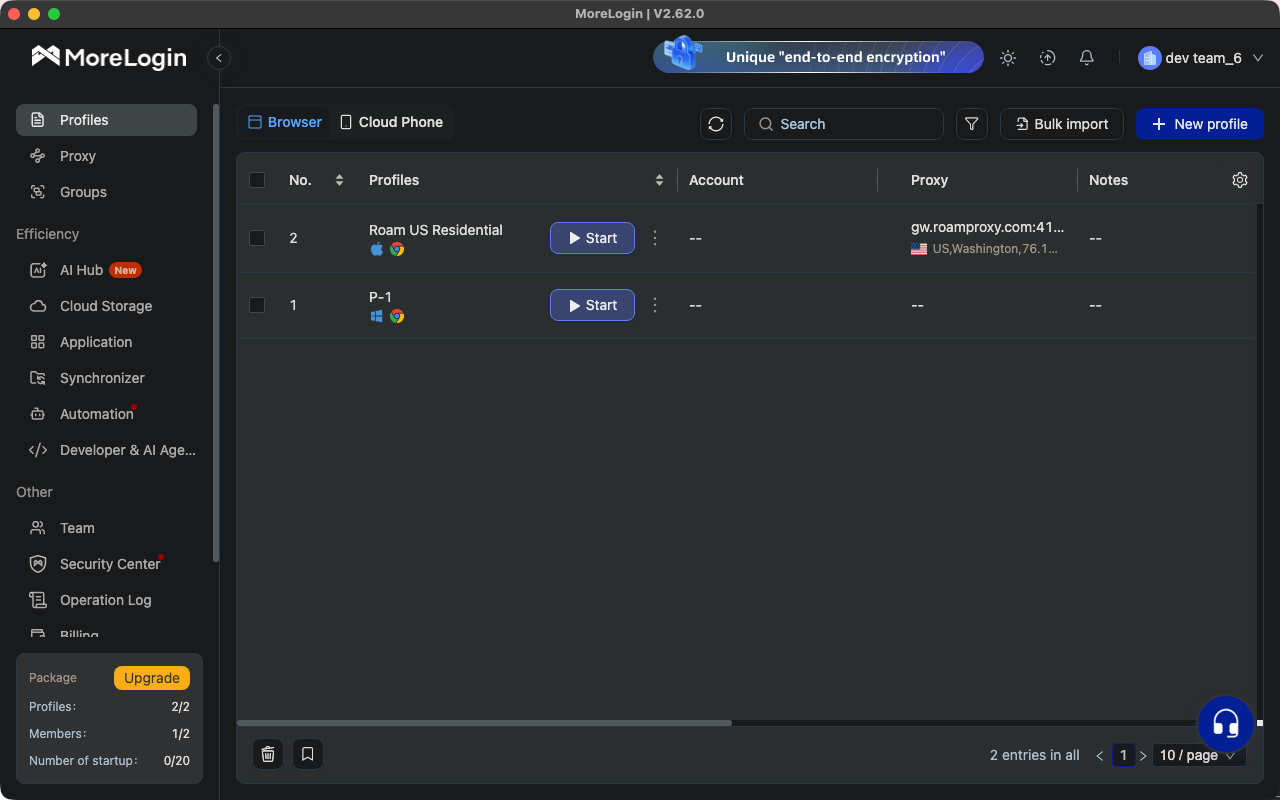
Click Confirm to save. The profile appears in the list with its proxy endpoint, flag and detected exit IP in the Proxy column — a useful at-a-glance check when you're running several profiles.
Step 5 — Open and verify the exit
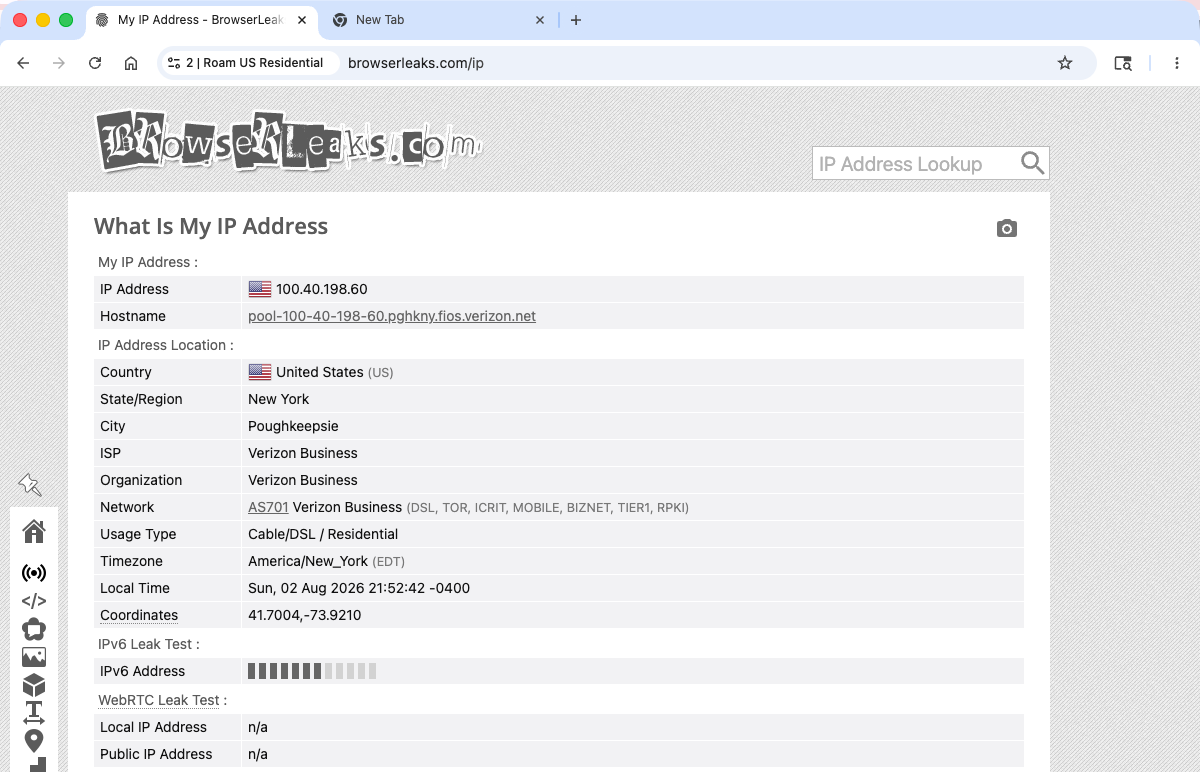
Press Start. MoreLogin launches its Chromium profile browser and opens on its own IP dashboard, which already shows the export IP, country/state and matched timezone. For a stricter check, go to an IP checker such as browserleaks.com/ip and look at the hostname. Ours resolved to 100.40.198.60 — hostname pool-100-40-198-60.pghkny.fios.verizon.net, Verizon FiOS in Poughkeepsie, New York, with Usage Type listed as Cable/DSL / Residential. That is a genuine consumer fibre line, not a hosting range. WebRTC shows n/a for both local and public IP, so nothing leaks around the proxy.
Rotate or keep the IP
The -session-<id> token in the username controls stickiness. Keep it identical and the profile reuses the same residential IP every launch — which is what you want for accounts you sign into repeatedly. Drop or change it and each connection draws a fresh IP: fine for scraping, but a logged-in account will start seeing challenges. For accounts you plan to hold for months, a dedicated static residential IP ($4/IP/month) is steadier still. One rule holds either way: one profile, one exit — never point two MoreLogin profiles at the same IP.
FAQ
Why is there no proxy option when I create a MoreLogin profile?
You're on the Quick create tab, which only sets browser, OS and profile count. Switch to Advanced create — the Proxy block with Proxy type, server, port, account and password lives there.
What do I put in MoreLogin's proxy fields for Roam?
Proxy type HTTP, Proxy server gw.roamproxy.com, Port 41080, Proxy account = your Roam username + -country-<cc>, Proxy password = your Roam proxy password. SOCKS5 works on the same port if you'd rather use it.
proxy detection fails — what now?
Check the port field first: MoreLogin puts it after the colon in the same row as the server, and it turns red if left empty. Then confirm the credentials outside the app with curl -x http://user:pass@gw.roamproxy.com:41080 https://ipinfo.io/json. If curl returns an IP but detection doesn't, switch the IP query channel and retry.
How do I give each MoreLogin profile its own IP?
Use a different -session-<id> token per profile. Each token maps to its own sticky residential IP, so no two profiles share an exit. For long-lived accounts, assign a dedicated static residential IP instead.
How much does it cost to test MoreLogin + Roam?
Very little. MoreLogin's free plan covers two profiles, and Roam starts from a $2 top-up with +50% on your first top-up — more than enough to create the profile, run proxy detection and confirm your residential exit IP before you scale up. After that it's $2/GB metered, no subscription.
Give every MoreLogin profile a real residential exit: get started from $2 — your first top-up gets +50%, then $2/GB metered with no subscription. Related: Dolphin{anty} proxy setup · GoLogin proxy setup · AdsPower proxy setup · Hubstudio proxy setup.