How to Set Up Residential Proxies in Dolphin{anty} (with Screenshots)
Published: 3 August 2026 · Tested on Dolphin{anty} 2026.204.259 (macOS), free plan · Every step shown on a real profile
TL;DR: Dolphin{anty} gives each profile its own fingerprint; a residential proxy gives it a trustworthy IP. Create a profile, scroll to Proxy, click New proxy, keep type HTTP, and paste the whole connection on one line — gw.roamproxy.com:41080:yourname-country-us:yourpassword. Click the check icon in the field, wait for the green tick, then Start the profile and verify a residential exit. This works on Dolphin's free plan.
Dolphin{anty} is one of the most widely used antidetect browsers, and unlike most of its competitors it lets you run up to five profiles on a permanently free plan — which makes it the cheapest way to test a proxy provider properly. The fingerprint only holds up if the profile also leaves from a believable IP: a real residential line, not the datacenter your laptop or VPS sits in. Here's how to give a Dolphin profile a Roam residential exit, no plugin required.
Step 1 — Get your Roam credentials
Sign up at roamproxy.com, top up from $2, and copy three things: your proxy username, your proxy password, and the gateway gw.roamproxy.com:41080. HTTP and SOCKS5 share the same port. Append -country-<cc> to the username to choose the exit country, and -session-<id> to keep the same IP across launches.
Step 2 — Create a new profile
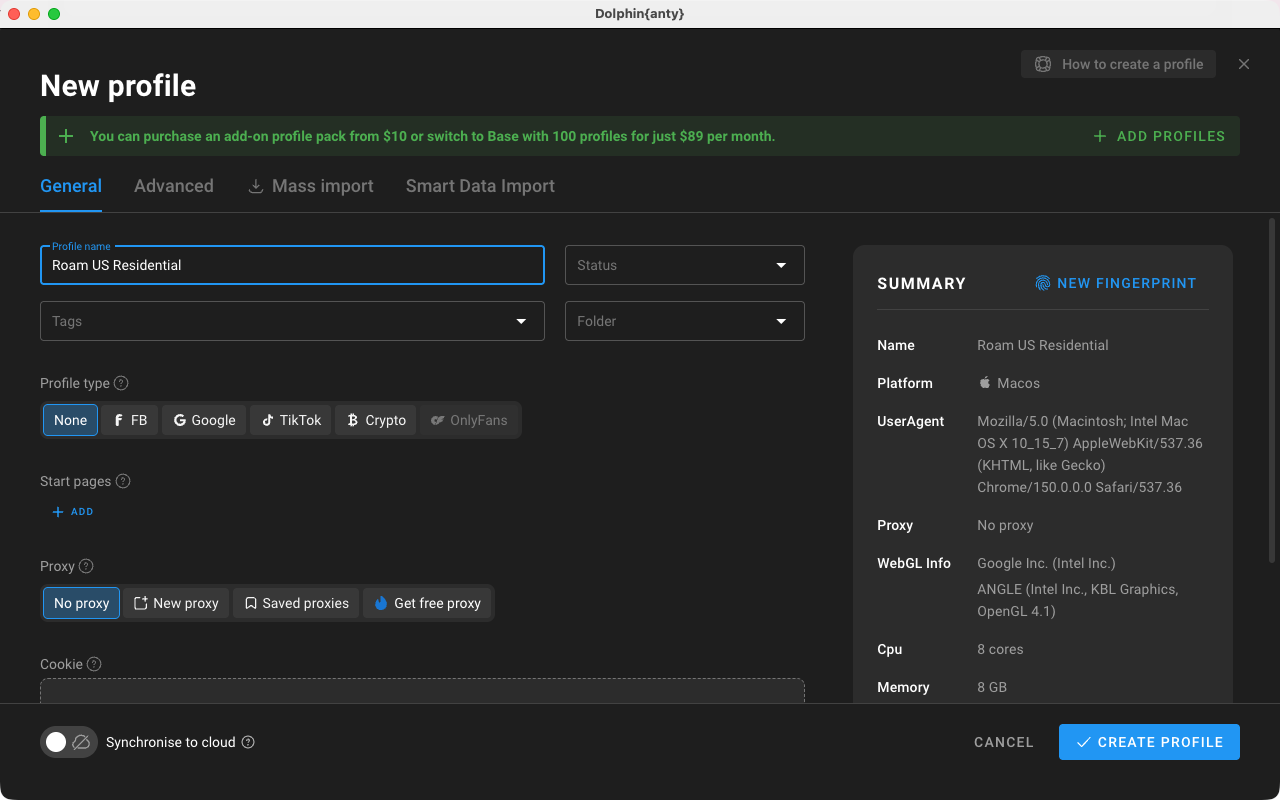
On All profiles, click the blue + button. On the General tab, replace the default "Profile 1" with a name you'll recognize — we used "Roam US Residential". The Summary panel on the right previews the fingerprint (platform, user agent, WebGL, cores) that this profile will present.
Step 3 — Enter the Roam proxy
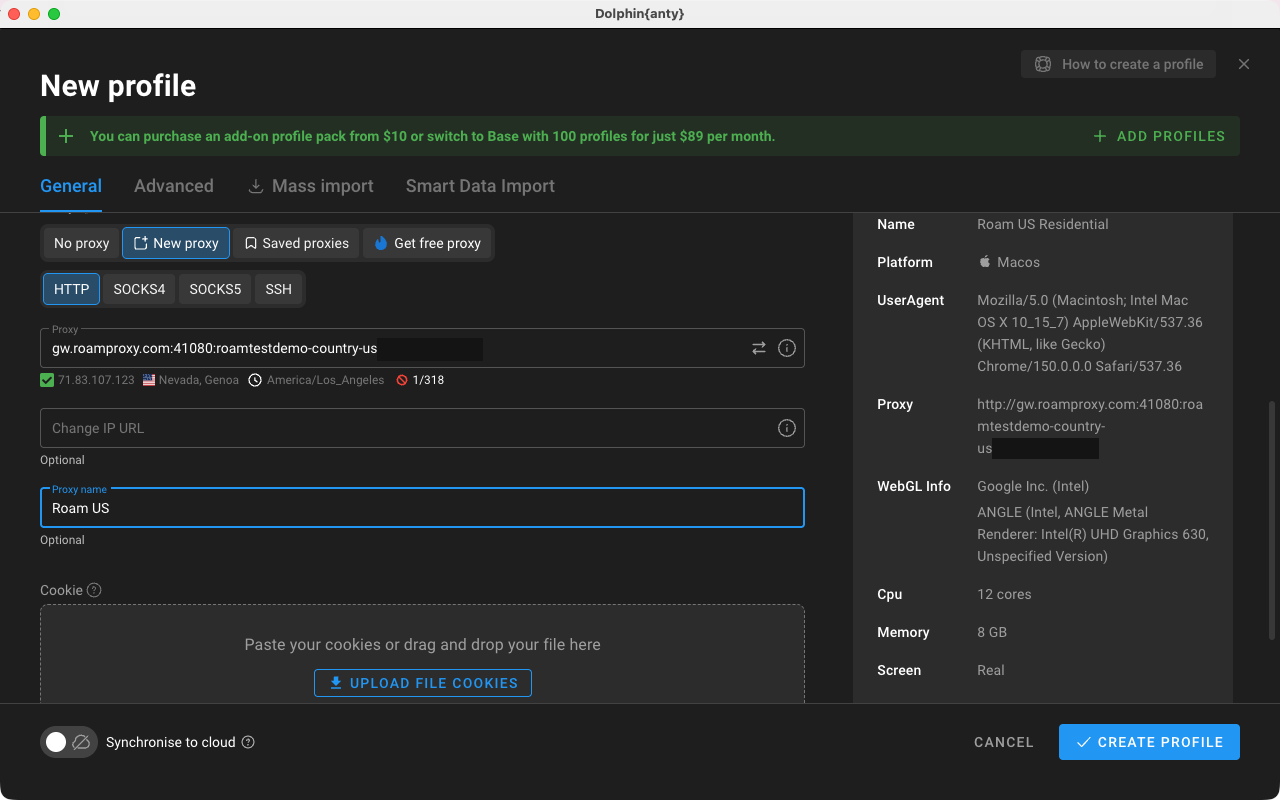
Scroll down to Proxy and click New proxy. Leave the type on HTTP (SOCKS5 works on the same port if you prefer it). Dolphin uses a single combined field instead of four separate boxes, so paste the whole connection on one line:
- Format:
host:port:login:password - Example:
gw.roamproxy.com:41080:yourname-country-us:yourpassword - Proxy name (optional) is just a label — we used "Roam US" so it's easy to find later in the Proxy manager.
Dolphin parses the line immediately: the Summary panel on the right rewrites it as a full http://… URL, which is a quick way to confirm nothing was mistyped.
Step 4 — Test the proxy
Click the small check icon at the right edge of the Proxy field (its tooltip reads "Check connection"). Dolphin runs a live test and, on success, prints a green tick with the exit IP, flag, region and timezone right under the field. If it briefly says the proxy is invalid, click it once more — the first check sometimes fires before the field finishes parsing.
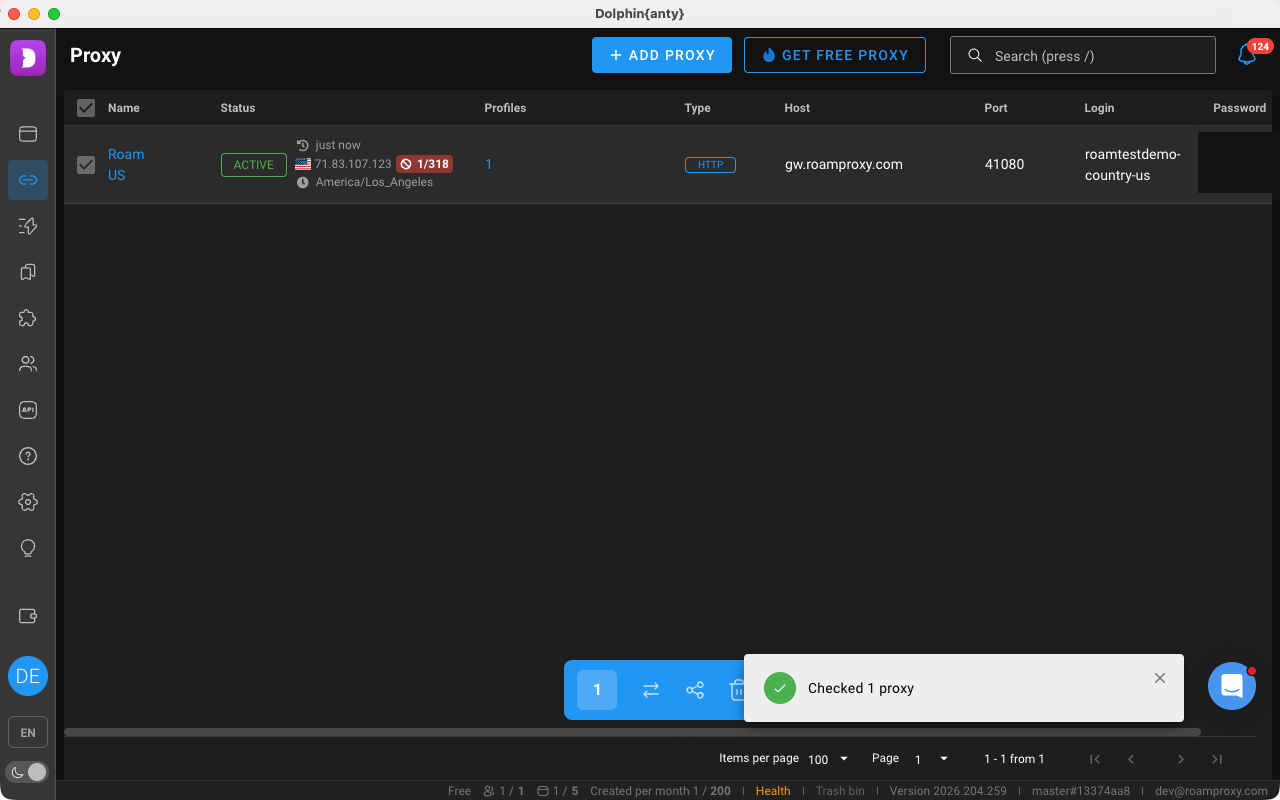
You can also test any saved proxy later from the Proxy manager in the left sidebar: tick the row and hit the check button. A verified proxy flips from UNKNOWN to ACTIVE with its IP, country and timezone.
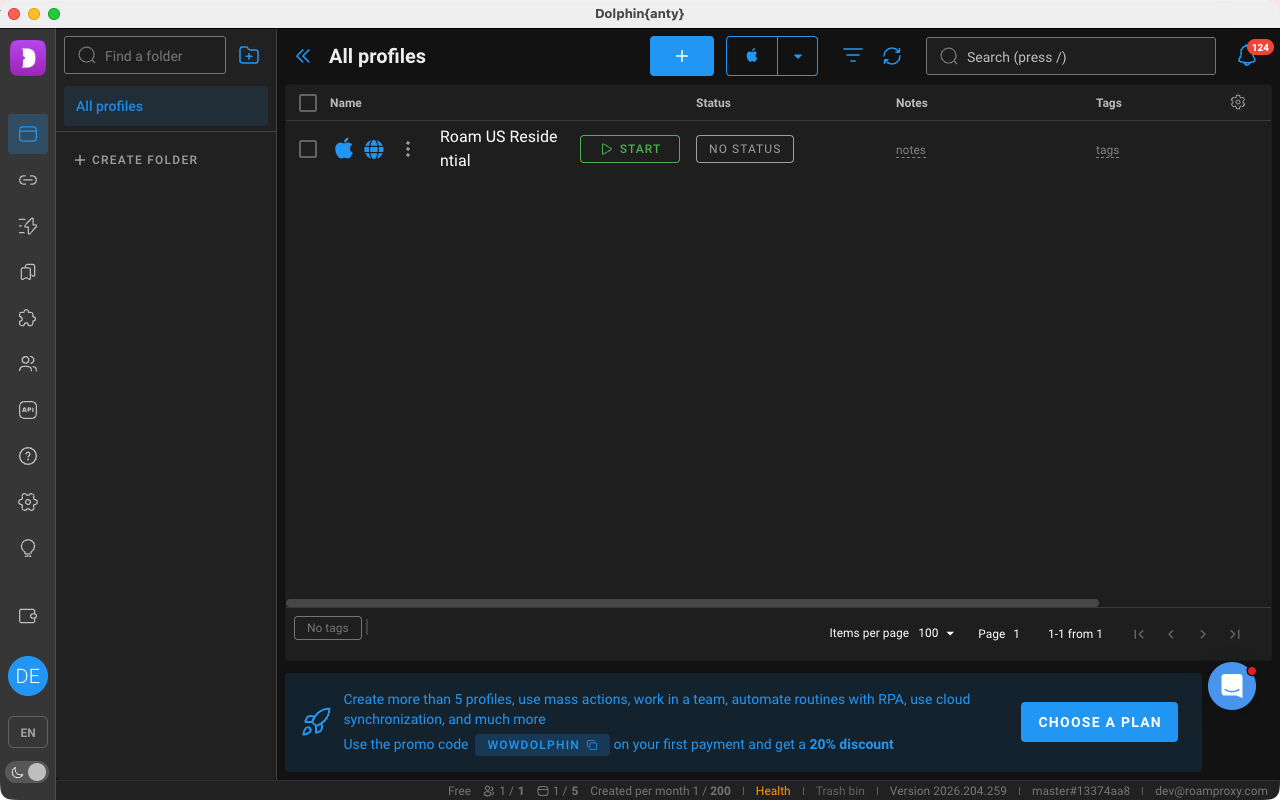
Back on the form, click Create profile. The profile appears in the list with a green Start button.
Step 5 — Open and verify the exit
Press Start. Dolphin launches the Anty browser with the profile's fingerprint and routes it through the proxy. Visit an IP checker such as browserleaks.com/ip and confirm the exit is a real consumer ISP in your chosen country — not a hosting provider. Our run resolved to 66.214.193.139 in San Luis Obispo, California: Charter Communications / Spectrum, hostname syn-066-214-193-139.res.spectrum.com. That .res.spectrum.com hostname is the giveaway — it's a residential cable line, exactly what an anti-bot system expects a human to be on. IPv6 shows n/a, so there's no leak around the proxy.
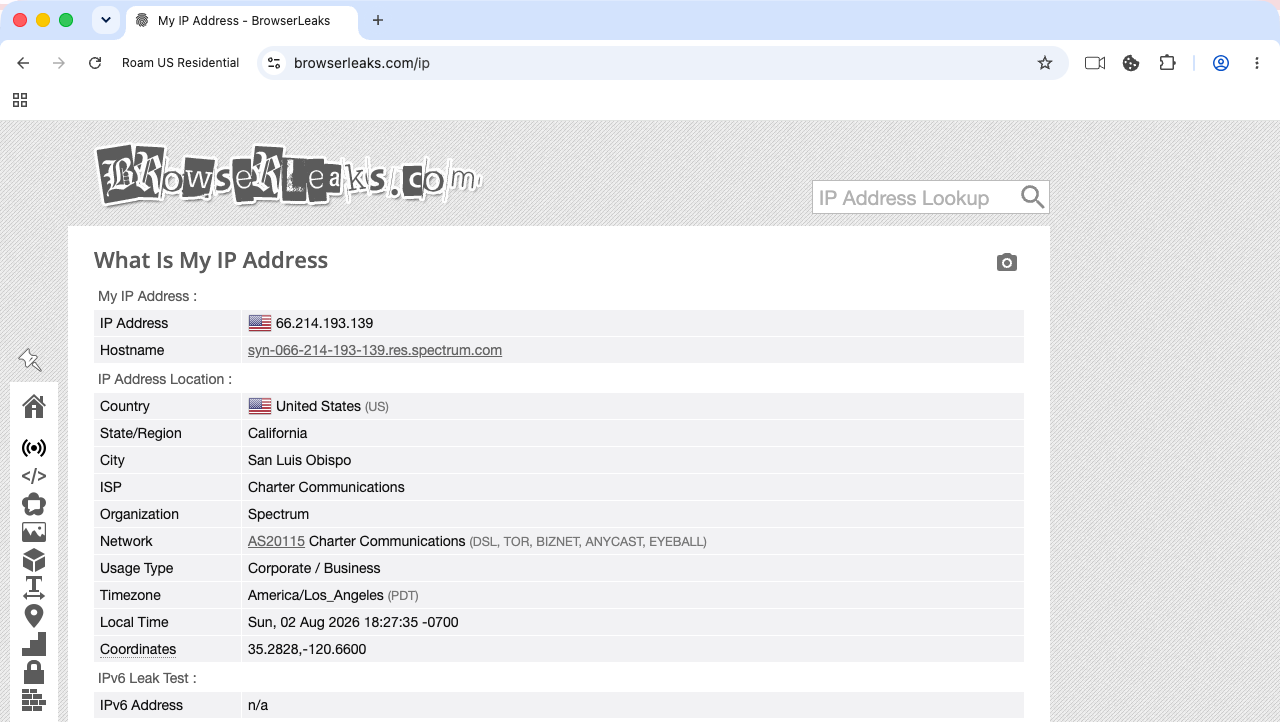
.res.spectrum.com.Rotate or keep the IP
The -session-<id> token in the username controls stickiness. Keep it identical and the profile reuses the same residential IP every launch — which is what you want for accounts you sign into repeatedly. Drop or change it and every connection draws a fresh IP, which is fine for scraping but will get a logged-in account challenged. For accounts you intend to hold for months, a dedicated static residential IP ($4/IP/month) is steadier still. One rule holds regardless: one profile, one exit — never point two Dolphin profiles at the same IP.
FAQ
What proxy format does Dolphin{anty} expect?
A single line in host:port:login:password order — for Roam that's gw.roamproxy.com:41080:yourname-country-us:yourpassword. Dolphin splits it for you and shows the parsed URL in the Summary panel. HTTP and SOCKS5 both work on port 41080.
Why does my proxy check fail the first time?
Dolphin sometimes fires the check before it has finished parsing the pasted line, and reports "Proxy is invalid or is restricted for checking host". Click the check icon again — the second run returns the exit IP normally. If it keeps failing, confirm the credentials with curl -x http://user:pass@gw.roamproxy.com:41080 https://ipinfo.io/json from a terminal.
How do I give each Dolphin profile its own IP?
Use a different -session-<id> token per profile. Each token maps to its own sticky residential IP, so no two profiles ever share an exit. For long-lived accounts, assign a dedicated static residential IP instead.
Does this work on the Dolphin{anty} free plan?
Yes. Everything shown here — creating the profile, saving the proxy, running Check connection and launching the Anty browser — was done on Dolphin's free tier, which allows up to five profiles. Nothing in the proxy setup is gated behind a paid plan.
How much does it cost to test Dolphin{anty} + Roam?
Very little. Dolphin's free plan covers five profiles, and Roam starts from a $2 top-up with +50% on your first top-up — more than enough to create a profile, run Check connection and confirm your residential exit IP before you scale up. After that it's $2/GB metered, no subscription.
Give every Dolphin{anty} profile a real residential exit: get started from $2 — your first top-up gets +50%, then $2/GB metered with no subscription. Related: GoLogin proxy setup · AdsPower proxy setup · Hubstudio proxy setup · Multilogin proxy setup.